Queries
Query your documents and annotations with SQL.
Ragnerock provides a SQL query interface that lets you run SELECT queries against virtual tables representing your documents, chunks, pages, and annotation data. All queries are automatically scoped to your project and executed in a read-only, security-hardened environment. This page covers the Query Explorer UI, available tables, supported SQL syntax, and security model.
Using the Query Explorer
The Query Explorer is the primary way to run SQL queries. Open it from the Queries section in the sidebar, or add a Query cell in a notebook.
SQL Mode
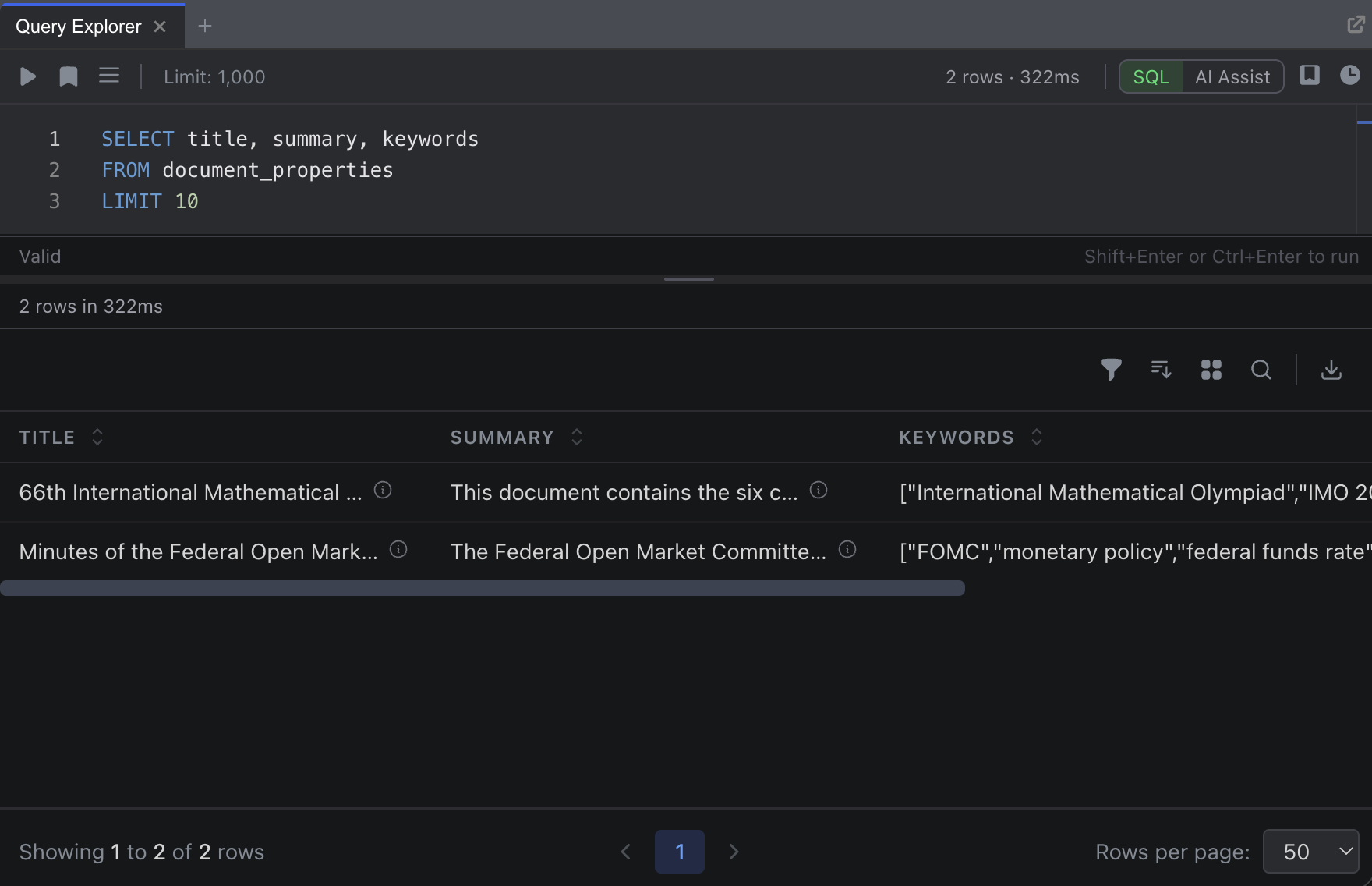
The Query Explorer provides a full-featured SQL editor powered by Monaco (the same editor used in VS Code). Write your query, then click Execute or press Shift+Enter to run it.
Results appear in a table below the editor with:
- Sortable columns: Click any column header to sort ascending or descending
- Filtering: Add conditions to filter rows (equals, contains, greater than, etc.)
- Grouping: Group rows by any column with collapsible sections
- Row limit: Choose how many rows to display (100, 500, 1,000, 2,500, or 5,000)
- Pagination: Navigate through large result sets
- Export: Download results for use in other tools
AI-Assisted Mode
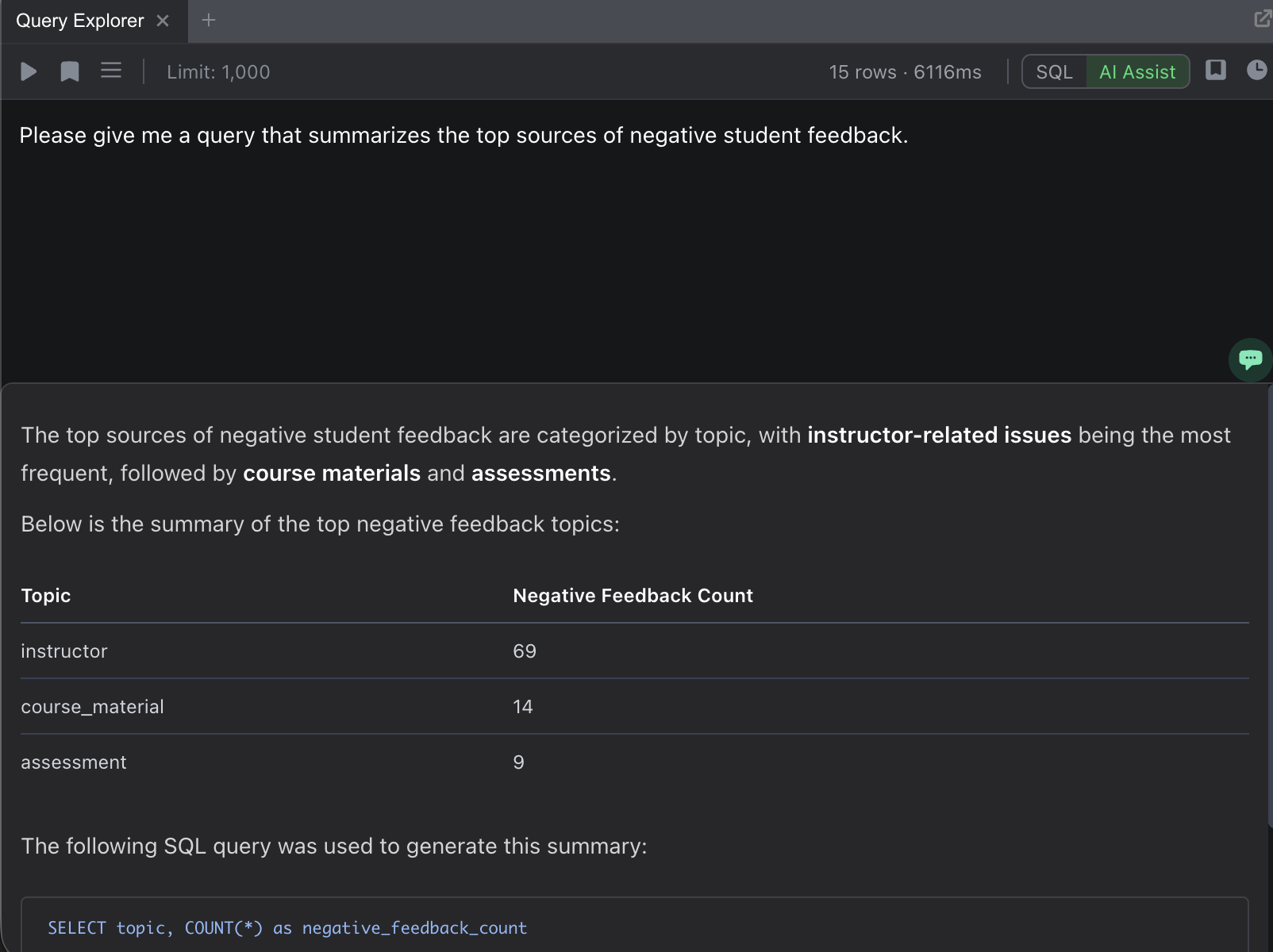
Switch to AI-assisted mode to describe what you want in natural language. The system generates the appropriate SQL query, shows you the generated SQL with an explanation, and executes it.
For example, type: “Show me all documents with negative sentiment and their confidence scores, sorted by confidence”
The generated SQL appears in the editor where you can review or modify it before executing.
Saving and History
- Save queries: Click Save to name and store frequently used queries. Access saved queries from the saved queries popover.
- Query history: Recent queries are automatically tracked with timestamps, so you can quickly re-run previous analyses.
Virtual Tables
Every project has three built-in virtual tables. All queries are automatically filtered to your current project, and soft-deleted records are excluded.
documents
The documents table contains metadata for every uploaded document in your project.
| Column | Type | Description |
|---|---|---|
id | UUID | Document identifier |
name | TEXT | Document filename |
file_type | TEXT | File format (pdf, docx, csv, etc.) |
filesize | INTEGER | File size in bytes |
created_at | TIMESTAMP | Upload timestamp |
updated_at | TIMESTAMP | Last modification timestamp |
You can also reference this table as document. Both forms are accepted.
SELECT name, file_type, filesize
FROM documents
WHERE file_type = 'pdf'
ORDER BY created_at DESC
LIMIT 10
chunks
The chunks table contains text segments extracted from documents during ingestion. Each chunk represents a paragraph or sentence, depending on how the document was processed.
| Column | Type | Description |
|---|---|---|
id | UUID | Chunk identifier |
document_id | UUID | Parent document |
content | TEXT | Chunk text content |
document_offset | INTEGER | Position within the document (0-indexed) |
chunk_type | ENUM | PARAGRAPH or SENTENCE |
start_char_idx | INTEGER | Start character offset in the source document |
end_char_idx | INTEGER | End character offset in the source document |
Table aliases: chunks, document_chunks, documentchunk.
The chunk_type column accepts both lowercase and uppercase values. 'paragraph' is automatically converted to 'PARAGRAPH'.
pages
The pages table contains page-level content for documents that have distinct pages (primarily PDFs).
| Column | Type | Description |
|---|---|---|
id | UUID | Page identifier |
document_id | UUID | Parent document |
page_number | INTEGER | Page number (0-indexed) |
content | TEXT | Full page text |
created_at | TIMESTAMP | Extraction timestamp |
Table aliases: pages, document_pages, documentpage.
Annotation Tables
Each operator you create in your project automatically generates a queryable virtual table. The system reads your operator’s JSON Schema and builds the table dynamically. No schema migration is needed.
Table Naming
Operator names are converted to SQL-friendly table names by lowercasing and replacing spaces and hyphens with underscores.
| Operator Name | SQL Table Name |
|---|---|
| Sentiment Analysis | sentiment_analysis |
| Content Classification | content_classification |
| Risk-Assessment | risk_assessment |
| Entity Extraction | entity_extraction |
You can use either the original operator name or the SQL-friendly name in your queries.
Standard Columns
Every annotation table includes these columns alongside the fields defined in the operator’s JSON Schema:
| Column | Type | Description |
|---|---|---|
annotation_id | UUID | Unique annotation identifier |
document_id | UUID | Source document |
chunk_id | UUID | Source chunk (for paragraph- or sentence-scoped operators) |
page_id | UUID | Source page (for page-scoped operators) |
confidence_score | NUMERIC | Model confidence score |
created_at | TIMESTAMP | When the annotation was created |
Which ID columns are populated depends on the operator’s scope. A document-scoped operator populates document_id; a paragraph-scoped operator populates both chunk_id and document_id.
Type Casting
Your operator’s JSON Schema types are automatically cast to SQL types:
| JSON Schema Type | SQL Type |
|---|---|
string | TEXT |
number | NUMERIC |
integer | BIGINT |
boolean | BOOLEAN |
array | JSONB |
object | JSONB |
Nullable types like ["string", "null"] are resolved to the non-null type. Array and object fields are reconstructed into proper JSON values. You can select them, but filtering on individual elements within arrays or objects is not supported.
Tabular Document Tables
CSV and Excel files uploaded to your project automatically become queryable as virtual tables, with columns typed according to the detected schema.
CSV Files
The table name is derived from the filename: lowercase, strip the .csv extension, and replace non-alphanumeric characters with underscores.
| Filename | SQL Table Name |
|---|---|
Q3 Financials.csv | q3_financials |
holdings-2024.csv | holdings_2024 |
Each table includes row_id, document_id, and row_index columns in addition to the data columns from the file.
Excel Files
Multi-sheet Excel files generate one table per sheet using the convention {document}__{sheet} (double underscore separator).
| File | Sheet | SQL Table Name |
|---|---|---|
portfolio.xlsx | Holdings | portfolio__holdings |
portfolio.xlsx | Trades | portfolio__trades |
Naming Constraints
Tabular document table names cannot collide with operator names, built-in tables (documents, chunks, pages), or SQL reserved words. If a collision occurs, rename the document or query the data through the built-in tabular_rows table with a document_id filter.
Supported SQL
SELECT
Standard column selection with aliases:
SELECT
    d.name AS document_name,
    sa.overall_sentiment,
    sa.confidence_score
FROM sentiment_analysis sa
JOIN documents d ON sa.document_id = d.id
All whitelisted functions can be used in the SELECT clause.
FROM and JOIN
All standard join types are supported:
| Join Type | Syntax |
|---|---|
| Inner join | JOIN or INNER JOIN |
| Left join | LEFT JOIN |
| Right join | RIGHT JOIN |
| Full outer join | FULL JOIN |
| Cross join | CROSS JOIN |
SELECT d.name, c.content, c.chunk_type
FROM documents d
JOIN chunks c ON d.id = c.document_id
WHERE d.name LIKE '%earnings%'
ORDER BY c.document_offset
WHERE
| Operator | Example |
|---|---|
=, != | WHERE file_type = 'pdf' |
<, <=, >, >= | WHERE confidence_score >= 0.8 |
LIKE, ILIKE | WHERE name ILIKE '%annual report%' |
IN | WHERE risk_level IN ('high', 'critical') |
BETWEEN | WHERE created_at BETWEEN '2024-01-01' AND '2024-12-31' |
IS NULL, IS NOT NULL | WHERE revenue IS NOT NULL |
AND, OR, NOT | WHERE score > 0.5 AND category = 'positive' |
GROUP BY and HAVING
Standard aggregation with GROUP BY. Use HAVING to filter on aggregated values.
SELECT risk_category, COUNT(*) AS count
FROM risk_classification
GROUP BY risk_category
HAVING COUNT(*) > 5
ORDER BY count DESC
ORDER BY and LIMIT
ORDER BY supports ASC (default) and DESC. Use LIMIT to cap the number of rows returned.
SELECT name, filesize
FROM documents
ORDER BY filesize DESC
LIMIT 25
Functions
Aggregate Functions
| Function | Description | Example |
|---|---|---|
COUNT(*) | Row count | COUNT(*) AS total |
COUNT(DISTINCT col) | Distinct count | COUNT(DISTINCT document_id) |
SUM(col) | Sum | SUM(revenue) |
AVG(col) | Average | AVG(sentiment_score) |
MIN(col) | Minimum | MIN(created_at) |
MAX(col) | Maximum | MAX(confidence_score) |
String Functions
| Function | Description |
|---|---|
LOWER(col) | Convert to lowercase |
UPPER(col) | Convert to uppercase |
LENGTH(col) | String length |
Date Functions
| Function | Description |
|---|---|
DATE(col) | Extract date from a timestamp |
CURRENT_DATE | Current date |
CURRENT_TIMESTAMP | Current timestamp |
Type and Conditional Functions
| Function | Description |
|---|---|
CAST(expr AS type) | Type conversion |
COALESCE(a, b, ...) | First non-null value |
CASE WHEN ... THEN ... ELSE ... END | Conditional logic |
CASE is useful for mapping annotation values to custom categories:
SELECT
    d.name,
    CASE
        WHEN sa.overall_sentiment IN ('positive', 'very_positive') THEN 'bullish'
        WHEN sa.overall_sentiment IN ('negative', 'very_negative') THEN 'bearish'
        ELSE 'neutral'
    END AS signal
FROM sentiment_analysis sa
JOIN documents d ON sa.document_id = d.id
Unsupported Operations
The query system uses a whitelist-based security model. Only explicitly allowed operations are permitted. The following are not supported:
| Operation | Reason |
|---|---|
| Subqueries | Not supported for security reasons |
UNION / INTERSECT / EXCEPT | Set operations are not supported |
WITH (CTEs) | Reserved for internal use by the query engine |
Window functions (OVER, PARTITION BY) | Not currently supported |
INSERT, UPDATE, DELETE | All queries are read-only |
CREATE, ALTER, DROP | Schema modification is not allowed |
SQL comments (--, /* */) | Stripped for security |
If you need capabilities beyond what the query interface supports, export your query results to a notebook. In a Ragnerock notebook, add a Query cell with your SQL. The results become a DataFrame artifact you can import into a code cell and work with using pandas, or connect to your JupyterLab environment for analysis with your full local toolkit.
Project Scoping and Security
Automatic Project Filtering
All queries are automatically scoped to your current project. You never need to add WHERE project_id = .... The system injects this constraint into every query before execution. Queries against chunks and pages include an existence check ensuring the parent document belongs to your project.
Read-Only Enforcement
Only SELECT statements are permitted. Any attempt to run data modification (INSERT, UPDATE, DELETE) or schema modification (CREATE, ALTER, DROP) statements returns a FORBIDDEN_OPERATION error.
Query Validation
You can validate a query before executing it. The validation endpoint checks for syntax errors, unknown tables, unknown columns, and forbidden operations, returning structured error messages with suggestions for fixing common issues.
Limits and Constraints
| Constraint | Value | Description |
|---|---|---|
| Default result rows | 1,000 | Default maximum rows returned per query |
| Maximum result rows | 500,000 | Hard cap on rows returned |
| Query timeout | 300 seconds | Maximum execution time |
| Rate limit (execute) | 30 per minute | Query executions per user |
| Rate limit (validate) | 10 per minute | Validation requests per user |
You can set the row limit in the Query Explorer toolbar or by adding a LIMIT clause to your query. Queries that exceed the timeout return a TIMEOUT error.
Example Queries
These examples progress from simple lookups to multi-table joins with aggregation.
Simple Document Lookup
List recent PDF documents:
SELECT name, filesize, created_at
FROM documents
WHERE file_type = 'pdf'
ORDER BY created_at DESC
LIMIT 10
Document and Chunk Join
Find paragraphs in earnings-related documents:
SELECT d.name, c.content, c.chunk_type
FROM documents d
JOIN chunks c ON d.id = c.document_id
WHERE c.chunk_type = 'paragraph'
  AND d.name LIKE '%earnings%'
ORDER BY c.document_offset
Annotation Query with Filtering
Find documents with negative sentiment and high confidence:
SELECT
    d.name AS document_name,
    sa.overall_sentiment,
    sa.confidence_score
FROM sentiment_analysis sa
JOIN documents d ON sa.document_id = d.id
WHERE sa.overall_sentiment IN ('negative', 'very_negative')
  AND sa.confidence_score > 0.8
ORDER BY sa.confidence_score DESC
Multi-Table Join with Aggregation
Aggregate annotation statistics per document:
SELECT
    d.name AS document_name,
    COUNT(*) AS annotation_count,
    AVG(sa.confidence_score) AS avg_confidence,
    MIN(sa.confidence_score) AS min_confidence,
    MAX(sa.confidence_score) AS max_confidence
FROM documents d
JOIN sentiment_analysis sa ON d.id = sa.document_id
WHERE d.file_type = 'pdf'
GROUP BY d.name
ORDER BY avg_confidence DESC
LIMIT 20
GROUP BY with HAVING
Find frequently mentioned entities:
SELECT
    name,
    type,
    COUNT(*) AS mentions
FROM entity_extraction
GROUP BY name, type
HAVING COUNT(*) >= 3
ORDER BY mentions DESC
LIMIT 50
Next Steps
- Operators: Design the operators that become queryable tables
- JupyterLab Integration: Import query results into your local Jupyter environment for analysis