Bring Your Own Database
Store your document data in your own PostgreSQL or BigQuery database for full data sovereignty.
Ragnerock can store your document data in a database you control instead of the default managed database. Embeddings, user accounts, and platform metadata remain in Ragnerock’s infrastructure, but documents, chunks, pages, and annotations live in your database.
What Moves to Your Database
| Your Database | Ragnerock Database |
|---|---|
| Document | Account, User, Project, Team |
| DocumentChunk | DocumentGroup |
| DocumentPage | DocumentChunkEmbedding |
| AnnotationRoot | Operator, Workflow |
| AnnotationValue | Notebook, Cell |
| UsageEvent, AccountQuota |
Embeddings stay in Ragnerock because they require a specialized vector database for similarity search. All other document-related data moves to your database, giving you full ownership and direct query access.
Supported Providers
| Provider | Status | Notes |
|---|---|---|
| PostgreSQL | GA | Full support including optional schema isolation |
| BigQuery | GA | No foreign key constraints; UUIDs stored as 32-character hex strings; JSON stored as STRING |
| Snowflake | Available | Organization-account identifier; a warehouse is required for writes |
| Databricks | Coming soon | - |
Setup
Configuration follows a three-step workflow: create, initialize, activate.
Navigate to Settings > Database to access the database configuration page. Click Add Database to start the setup wizard.
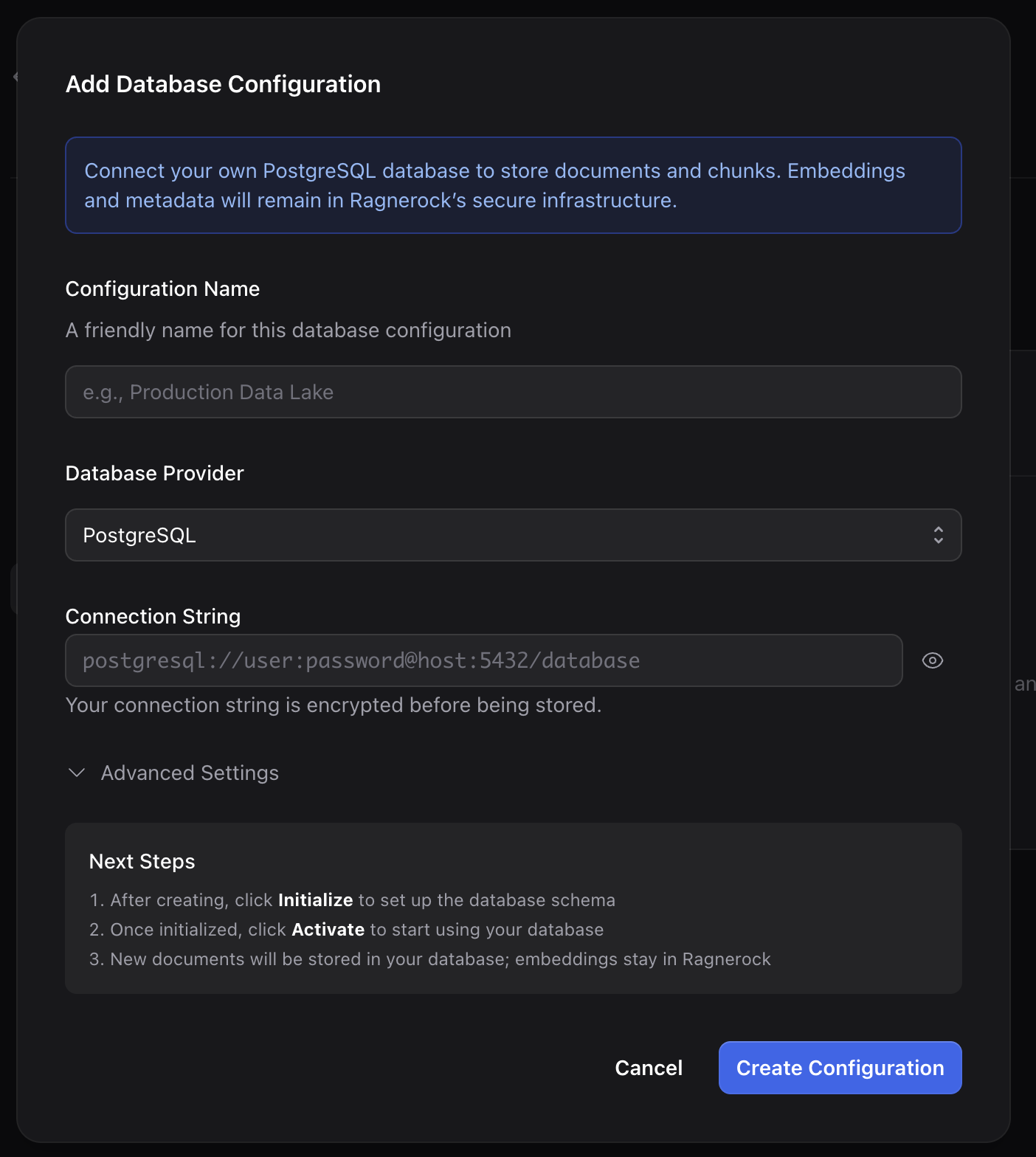
1. Create a Configuration
Select PostgreSQL or BigQuery as the provider type, then fill in your connection details.
PostgreSQL
Enter your PostgreSQL connection string in the format:
postgresql://user:password@host:5432/ragnerock_dataOptionally specify a schema name for schema isolation (e.g., ragnerock). The connection string supports standard PostgreSQL parameters including sslmode, sslrootcert, and connect_timeout:
postgresql://user:password@host:5432/dbname?sslmode=verify-full&sslrootcert=/path/to/ca.pemBigQuery
Enter your GCP project ID, dataset name, and upload your service account credentials (JSON key file). Optionally specify a dataset location (auto-detected if omitted).
The service account needs bigquery.dataEditor and bigquery.jobUser roles.
2. Initialize the Schema
After creating the configuration, click Initialize to create the required tables (Document, DocumentChunk, DocumentPage, AnnotationRoot, AnnotationValue) in your database. Tables are created with IF NOT EXISTS, so initialization is idempotent. You can safely run it multiple times.
3. Activate
Toggle the configuration to Active to start using it. Only one database configuration can be active per account. Activating a new configuration automatically deactivates any existing one. From this point on, all new document data is written to your database.
Using with Bring Your Own Blob Storage
BYODB and BYOBS (Bring Your Own Blob Storage) are independent features that complement each other. BYODB controls where structured document data is stored (database rows), while BYOBS controls where raw files are stored (object storage). Use both together for full data sovereignty.
Consistency Model
Ragnerock uses an eventual consistency model across the two databases. When a document is processed:
- Chunks are written to your database first
- Embeddings are generated and written to Ragnerock’s database
Each chunk tracks its embedding state (PENDING, COMPLETE, FAILED). A background reconciliation job retries any failed embeddings automatically. During the window between chunk creation and embedding completion, the chunk exists in your database but is not yet searchable via semantic search.
Managing Configurations
In the Database settings page, all your configurations are listed with their provider type, connection hint, and status (active, inactive, or uninitialized). From this page you can:
| Operation | Description |
|---|---|
| View details | Click a configuration to see its full settings and masked connection string |
| Update connection | Edit the connection string or credentials. Requires re-initialization and re-activation. |
| Deactivate | Toggle to inactive to revert to Ragnerock’s default database |
| Health check | Click Check Health to test connectivity and view status |
| Delete | Remove a configuration (must deactivate first) |
Security
Encryption: Connection strings and BigQuery credentials are encrypted at rest using envelope encryption. A per-configuration data encryption key (DEK) encrypts the credential, and the DEK itself is encrypted with a key encryption key (KEK) stored in a hardware-backed key management service.
Access control: Only account owners can create, update, initialize, activate, or delete database configurations. Other team members can view configurations with masked connection strings and check health status.
Connection masking: Connection strings are never returned in full. Only a masked hint is displayed (e.g., postgresql://user:***@host:5432/db).
Auto-deactivation: If Ragnerock fails to connect to your database 5 consecutive times, the configuration is automatically deactivated to prevent data loss. Resolve the connectivity issue and re-activate to resume.
Next Steps
- Bring Your Own Storage: Store raw files in your own cloud storage
- Annotations: Structured data produced by operators, stored in your database
- Data Sources: Understanding the data model