Bring Your Own AI
Use your own OpenAI, Anthropic, Google Gemini, or xAI API keys with Ragnerock.
Ragnerock’s Bring Your Own AI (BYOAI) feature lets you configure your own AI provider for all agent-powered features: the Research Agent, annotation operators, and workflow processing. You can also bring your own embedding provider for semantic search. This enables you to leverage existing AI provider contracts, comply with data residency requirements, or use specialized models. All of these work while keeping Ragnerock’s data processing and search infrastructure intact.
Supported Providers
| Provider | Default Model | Status |
|---|---|---|
| OpenAI | gpt-5.4-mini | Supported |
| Anthropic | claude-sonnet-4-6 | Supported |
| Google Gemini | gemini-3.8-flash | Supported |
| xAI | Grok models | Supported |
Gemini is Ragnerock’s default provider, used when no custom configuration is set. You can use any model from these providers, as long as it meets the requirements below.
Model Requirements
Any model you configure must support:
- Structured output: JSON mode for producing structured annotation results
- Streaming responses: Token-by-token output for real-time agent interactions
- Tool/function calling: Required for the Research Agent’s tool use
These capabilities are validated automatically when you create or update a configuration.
Creating a Configuration
Navigate to Settings (click your user icon in the sidebar) and select the AI Providers section.
- Click Add Provider
- Select the provider type (OpenAI, Anthropic, Google Gemini, or xAI)
- Enter your API key and the endpoint URL (pre-filled with defaults for each provider)
- Optionally set a config name, model name, timeout, and fallback to Ragnerock toggle
- Click Save. Ragnerock runs validation tests automatically before saving.
- Toggle the configuration to Active to start using it
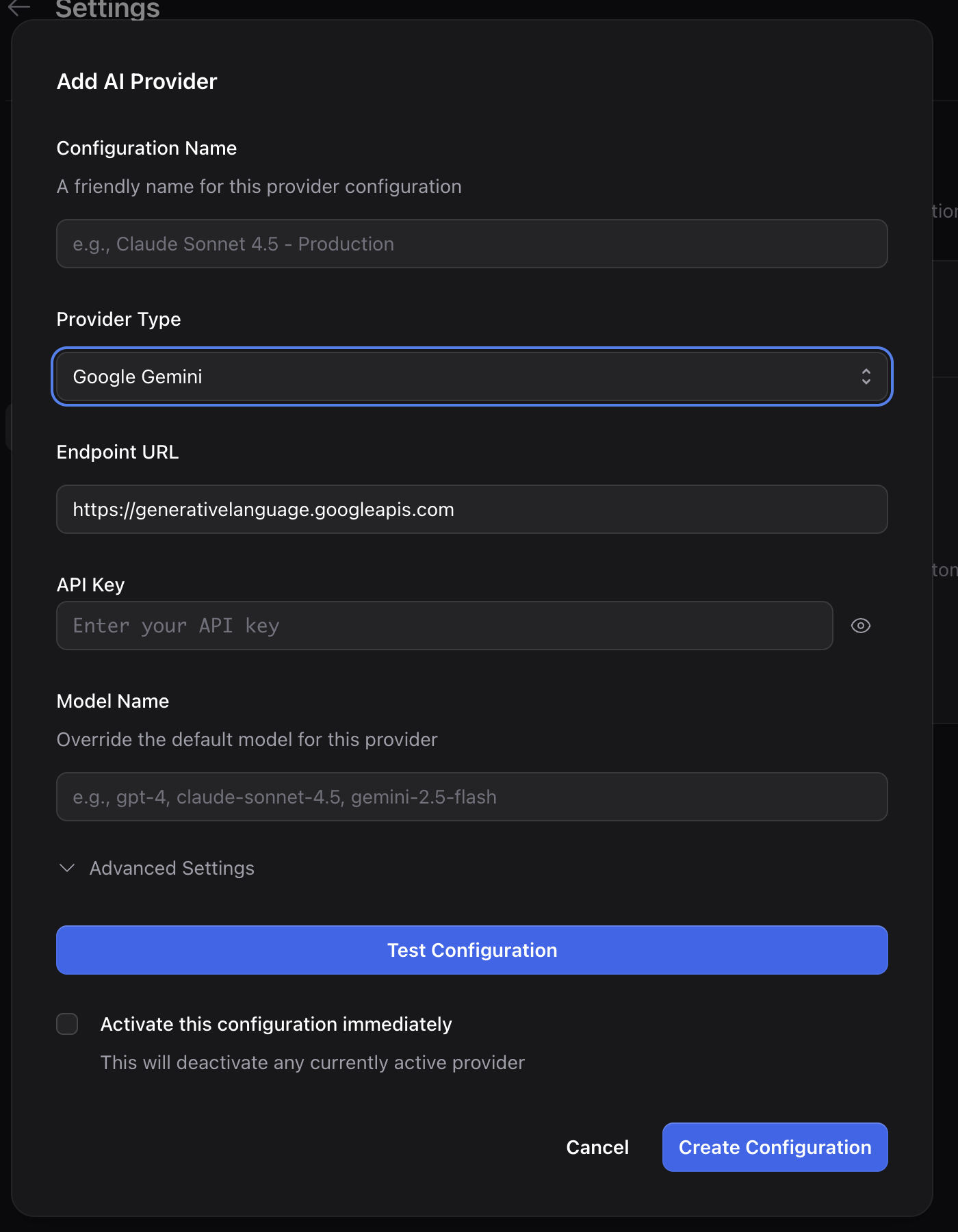
Provider Setup
OpenAI
Select OpenAI as the provider type. Enter your API key (starts with sk-). The default model is gpt-5.4-mini. Any OpenAI model that supports structured outputs, streaming, and function calling is compatible. This includes GPT-5.4-mini and newer models.
Anthropic
Select Anthropic as the provider type. Enter your API key (starts with sk-ant-). The default model is claude-sonnet-4-6. Anthropic models support tool use and streaming natively.
Google Gemini
Select Gemini as the provider type. Enter your Gemini API key. The default model is gemini-3.8-flash. Gemini is also Ragnerock’s default provider. Configuring your own Gemini key lets you use your own API quotas. Gemini’s large context window is particularly useful for processing long documents.
xAI
Select xAI as the provider type. Enter your xAI API key. Grok models are supported for both agent and annotation operations.
Validation
When you create or update a configuration, Ragnerock automatically runs four capability tests against your provider:
- Annotation test: Structured data production using JSON mode
- Streaming test: Token-by-token response delivery
- Tool calling test: Mock tool invocation
- Large input test: Handling ~5-6K token contexts
All four tests must pass before the configuration is saved. You can also run validation manually from the configuration card without saving, to test credentials before committing.
Managing Configurations
Your account can store multiple configurations, but only one can be active at a time. The active configuration is used for all agent-powered features: annotations, the Research Agent, and workflow operators.
In the AI Providers settings page, you can see all your configurations in a list with their provider type, model name, and active/inactive status.
Activating a Configuration
Toggle a configuration to Active to start using it. This automatically deactivates any previously active configuration.
Deactivating
Toggle a configuration to Inactive to return your account to Ragnerock’s default provider (Gemini).
Updating a Configuration
Click on a configuration to edit its settings. You can change the model name, timeout, fallback toggle, or credentials. If you update the provider type, endpoint, API key, or model, validation tests are re-run automatically.
Deleting a Configuration
Click Delete on a configuration card to remove it. Deleted configurations are soft-deleted and can no longer be activated.
Fallback Behavior
When creating or editing a configuration, enable the Fallback to Ragnerock toggle. With fallback enabled, Ragnerock automatically retries with its default Gemini provider if your configured provider returns an error or times out.
This ensures your workflows remain uninterrupted even if your provider experiences downtime. Usage is tracked separately for your provider and Ragnerock’s default.
Embeddings (Bring Your Own Embeddings)
Embeddings are used for semantic search within Ragnerock, defaulting to the Gemini when no alternative is configured. You may use any of the below embedding providers:
Supported Embedding Providers
| Provider | Default Model | Default Dimensions |
|---|---|---|
| Google Gemini | gemini-embedding-2 | 768 |
| Oracle Generative AI (OCI) | cohere.embed-english-v3.0 | 1024 |
Configuring Your Own Embeddings
In the AI Provider form, expand the Advanced Settings section and disable Use ragnerock default embeddings in the bottom embeddings section. After doing so, configure your embeddings provider as so
- Select an Embedding Provider. The endpoint, model, and dimensions pre-fill with that provider’s defaults, and can be customized as needed.
- Set the Embedding Model and Embedding Dimensions. Dimensions must match the output size of the model you choose.
- Supply the provider credentials in the api key field, if using Oracle then see the below note.
Oracle Generative AI Embeddings
Oracle Cloud Infrastructure (OCI) Generative AI serves Cohere embedding models. Unlike single-key providers, OCI authenticates with a credential bundle rather than a single API key. Paste your OCI config block together with your private key PEM into the OCI Credentials field for authenication The OCI config must contain all of the following:
tenancy— tenancy OCIDuser— user OCIDfingerprint— API signing key fingerprintregion— OCI region (the inference endpoint is derived from this, so there is no separate endpoint field for Oracle)compartment_id— compartment OCID for the Generative AI service- the private key PEM (the
key_content)It is important to note that
compartment_idis not part of the standard OCI config file. You must add it yourself withcompartment_id=ocid1.compartment.oc1..xxxx
Embedding Model Locking
Once your account has embedded documents, the embedding provider type, endpoint, model, and dimensions are locked. Changing them would make existing vectors incompatible with new ones, breaking semantic search. You can still update the embedding API key (for example, to rotate credentials), but to change the embedding model itself you would need to re-embed your data library.
Embedding credentials are protected by the same envelope encryption as your agent provider keys, and only a masked hint is ever shown.
Security
API keys are encrypted at rest using envelope encryption:
- Each configuration gets a unique Data Encryption Key (DEK)
- DEKs are encrypted with a master Key Encryption Key (KEK) stored in a hardware-backed key management service
- API keys are never returned in API responses. Only a masked hint is shown (e.g.,
sk-your...ykey).
Access to AI configurations is controlled by IAM permissions. Only account owners can create, modify, or delete configurations.
Next Steps
- Provider Routing: How Ragnerock secures and routes requests to your provider
- AI Research Agent: Agent capabilities powered by your provider
- Operators: Automated agents for data processing